
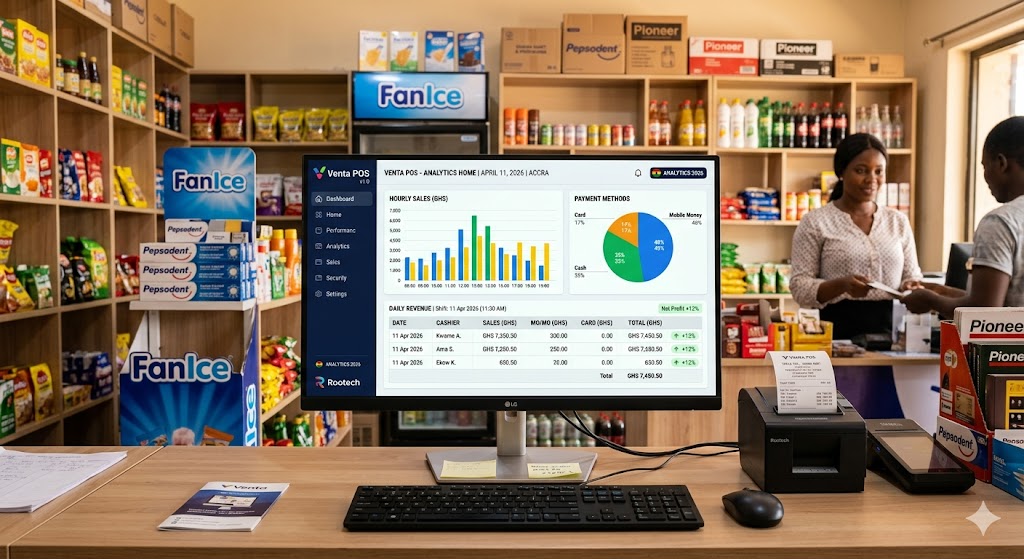
Ask most shop owners in Ghana how much they made last Tuesday and you will get one of three answers — a rough guess, a long silence, or a search through a handwritten book. That is not a criticism. It is simply the reality of running a busy shop without the right tools.
Venta POS changes that completely. Built into the system is a full reporting suite that tracks, analyses, and presents your sales data in ways that actually make sense — so you always know exactly what is happening in your business, in real time and historically.
Here is a full breakdown of every report available inside Venta POS.
Summary Sales Report — Your Business at a Glance
The Summary Sales Report gives you a clean overview of your sales performance without the noise. No product details, no categories — just pure sales numbers broken down the way you need them.
- By Month — Select any date and Venta POS will show you every month in that year, with total sales across your POS counter and wholesale channel side by side
- By Day — Drill into any specific month and see a row-by-row breakdown of sales for every single day
All data renders in a clean HTML table directly on screen, and a single click downloads a formatted Excel file for your records or accountant. Every report is also available via API in JSON, PDF, and Excel formats — making it easy to integrate with other systems.
Detailed Sales Report — Know Exactly What Is Selling
Want to know which products are moving and which are collecting dust? The Detailed Sales Report breaks down sales at the product level.
Filter by category, start date, and end date and you get a full table showing each product's barcode, name, POS sales, wholesale sales, and total combined — downloadable as Excel with one click.
For pharmacies tracking specific drug categories, wholesalers monitoring fast-moving goods, or cold stores watching beverage sales versus groceries — this report is invaluable.
Live Sales — Real Time. Every Counter. Every Cedi.
The Live Sales report is built for business owners who need to know what is happening right now, not at the end of the day.
It shows sales from the current active shift, broken down by each machine or counter in your shop. For every counter you see:
- Sales by payment method (cash, MoMo, card, etc.)
- Cancelled bills flagged separately for auditing
- Total valid sales excluding any cancellations
This is especially powerful for mini marts and restaurants with multiple counters — you can see at a glance if one cashier's counter is underperforming or if something unusual is happening mid-shift. Access requires admin credentials to protect your data.
Category Sales Analysis — See What Categories Are Driving Revenue
Every day, Venta POS can show you a pie chart breakdown of which product categories are generating the most revenue. Select a date and instantly see a visual comparison — are beverages outperforming snacks today? Is your pharmacy section carrying the business?
This daily category insight helps you make smarter stocking and pricing decisions without needing a business analyst.
Hourly Analysis — Find Your Busiest Hours
When is your shop actually busiest? Most owners think they know — but the data often tells a different story.
The Hourly Analysis report presents a bar chart of sales by hour for any selected day. You will immediately see your peak trading hours, slow periods, and patterns you never noticed before. This helps you plan staffing, schedule restocking, and even time your promotions for maximum impact.
Cashier Performance — Reward Your Best Staff
If you have more than one cashier, the Cashier Performance report shows you exactly how each one is performing on any given day — total sales processed, side by side.
This builds accountability without micromanagement. Your best cashiers get recognized. Underperformance becomes visible and addressable early.
Payment Methods — Know How Your Customers Pay
Cash? MoMo? Card? The Payment Methods report presents a pie chart showing the split across all payment types for any date you select. In Ghana where mobile money is dominant but cash is still king in many areas, knowing your payment method breakdown helps you plan float, negotiate better rates, and understand your customer base better.
POS Processing — Your Daily Sales Document, Always Ready
The POS Processing screen is your daily command center. It loads a full document view of the current day's sales automatically — no filters needed. Use the next and previous buttons to navigate between days and review historical daily sales at any time.
One System. Complete Visibility.
Most shop owners in Ghana make decisions based on instinct. With Venta POS, you make decisions based on data — and that difference is exactly what separates a shop that survives from one that grows.
Every single report described above is built into Venta POS as standard. No extra modules to buy. No complicated setup. Just install, start selling, and let the system do the reporting for you.
Ready to see what your business actually looks like in numbers? Visit rootechits.com to learn more or book a demo today.
Transformations Through Technology.