
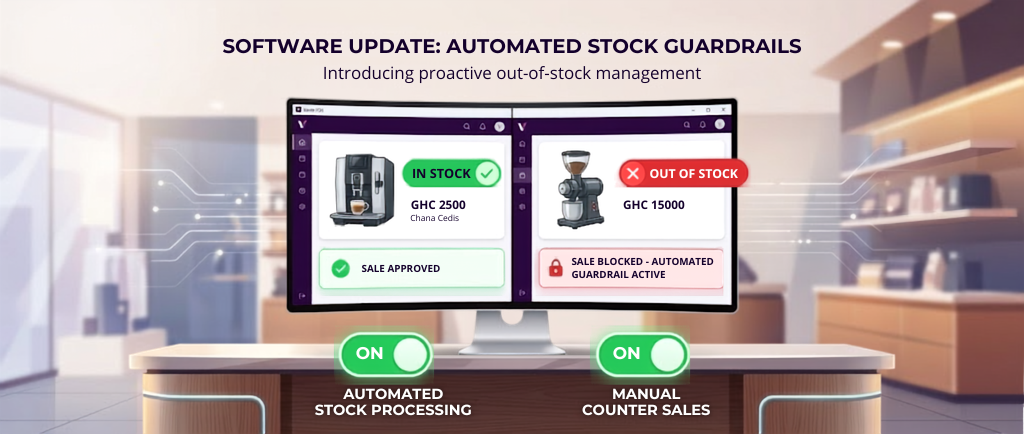
Overselling is one of the most damaging and preventable problems in Ghanaian retail. See how Venta POS live stock validation at the billing screen stops it permanently.
Why Your Shop Is Selling Stock You Don't Have
By Rootech IT Solutions LTD | Venta Suite | Product Features
It happens more often than most shop owners realize. A customer comes in, picks a product, the cashier rings it up, payment is made, and the product goes home with the customer. Normal transaction. Except when you check the stock at the end of the day — or worse, at the end of the week — you realize that product had already run out. The cashier sold something that was not there.
No theft. No fraud. Just a system that showed the wrong number at the wrong moment.
This is overselling — and it is one of the most common and costly stock problems in Ghanaian retail. It creates supplier disputes, customer complaints, financial discrepancies, and a stock record that slowly becomes completely unreliable.
Venta POS was built to make it impossible.

Why Overselling Happens
The root cause of overselling is almost always the same — the billing system the cashier is using does not reflect accurate, real-time stock levels at the moment of sale.
In a manual system, the cashier has no stock information at all. They sell based on what they think is available or what they were told during the last stocktake. By the time the discrepancy is discovered, dozens of transactions have passed and tracing the problem back to a specific sale is nearly impossible.
Even in basic digital systems, stock figures are often updated in batches — at the end of the day, or only when a manual stocktake is run. During the hours between updates, the cashier is operating blind.
The fix is not more frequent manual counts. The fix is making accurate stock information visible and enforceable at the exact moment of sale.

Live Stock Badges — Visibility at the Billing Screen
The first layer of Venta POS stock control is visibility. Every product displayed on the billing screen carries a live stock badge — a small indicator showing the current available quantity for that item at that location.
The cashier does not need to check a separate report, ask a manager, or leave the counter to know what is in stock. The number is right there on the product button, updated in real time with every transaction.
When a sale is processed, the stock count updates immediately. When a goods received note is posted in the back office, the updated stock figure syncs to the billing screen automatically — only changed products are pulled, not the full catalog, keeping the sync fast and efficient.
The cashier always sees the current number. Not yesterday's number. Not this morning's number. The number right now.

The Billing Guard — Hard Block on Overselling
Visibility alone is not enough. A cashier who is busy, distracted, or under pressure from a queue can still miss a low stock badge and attempt to sell more than what is available.
This is where Venta POS's billing guard comes in.
When stock validation is active, the system checks the requested quantity against the available stock before confirming every single line item in the cart. If a customer wants 10 units and only 3 are available — the system blocks the transaction at that quantity. Hard stop. The cashier cannot proceed with an oversell.
This is not a warning or a suggestion. It is a system-level block that makes overselling physically impossible regardless of how busy the counter is or how distracted the cashier might be.

Automatic Stock Adjustments — No Manual Entry
Every confirmed sale in Venta POS automatically decrements the stock count for each item sold. Every refund or return automatically increments it back. No manual entry. No end-of-day batch update. No reliance on anyone remembering to update a figure.
The stock record is always accurate because the system updates it at the moment of every transaction — in both directions.
This automatic adjustment flow extends to every stock-altering document in the system — goods received notes increase stock, invoices decrease it, transfers move it between locations, price changes update it, and sales returns restore it. Every movement is system-driven and every movement leaves an audit trail.

Manager-Controlled Counter Sales Flag
Not every product in your inventory should appear on the billing screen. A wholesale-only item should not show up at the retail counter. A product under price review should not be sold until the new price is confirmed. A damaged item pending writeoff should not be available for sale.
Venta POS gives managers a counter sales flag on every product — a simple toggle that controls whether an item appears on the billing screen or not. Turning it off removes the product from the cashier's view instantly. The product still exists in the system, its stock record is intact, and its history is preserved. It simply cannot be sold until the manager turns the flag back on.
This gives managers precise control over what the cashier sees — without deleting, deactivating, or altering any product data.

What Disappears When Stock Hits Zero
When stock validation is active and a product's available quantity reaches zero, it is automatically removed from the billing screen. The cashier cannot select it. Cannot add it to a cart. Cannot accidentally sell it to a customer.
The product reappears the moment new stock is received and the goods received note is posted in the back office. No manual refresh. No system restart. The sync happens automatically and the product returns to the billing screen with its updated stock count.
What This Means for Your Business
For a pharmacy — it means you never sell a medication you do not have, and a customer never leaves with a product that needs to be recalled or replaced.
For a cold store — it means your stock records actually match your shelves at the end of every day, and your supplier invoices reconcile accurately.
For a mini mart — it means your cashier is working with accurate information on every transaction, and your end-of-day cash matches your system totals.
For a wholesaler — it means bulk orders are blocked before they exceed available inventory, protecting you from commitments you cannot fulfil.
The stock control layer in Venta POS is not a report you run at the end of the day. It is a live, automatic system that operates at the moment of every single sale — making overselling impossible, stock records accurate, and the billing screen a source of truth rather than a source of risk.

Ready to put real stock control at your billing screen? Visit rootechits.com or WhatsApp +233 54 631 0011 to get started.
Transformations Through Technology.